
Archive页介绍
archive页面展示了当前博文的所有类型,在此之下依据年份时序展示所有博文。
改造计划:
-
添加对以tag分类的支持
-
支持在archive页展示tag模块
-
修改tag–tile的大小
-
修改tag–tile的排列方式
-
为tag分类的每一个tile添加不同颜色
-
-
修复在archive页面的category tile展示异常
-
修复category详细页的文章数量异常
-
添加archive页面对应配置项
使用开发者工具检查archive页面元素
发现category分类的元素为:
    <h2 class="section-title">类别 - Categories</h2>
    <div class="subsection-list">
        <div class="article-list--tile">
            <article>
            </article>
        </div>
    </div>
显然<div class="article-list--tile">的class属性命名并不合理,因为在archive首页展示的category列表的每一个tile并不是一篇article,因此应当修改为<div class="category-list--tile">。
在文件themes/hugo-theme-stack/layouts/_default/archives.html中将<div class="article-list--tile">修改为<div class="category-list--tile">。
同时将下列文件中的选择器article-list--tile修改为category-list--tile。在scss文件中建议保留原有的选择器,新增修改名称后的选择器。
themes/hugo-theme-stack/assets/scss/partials/article.scssthemes/hugo-theme-stack/assets/scss/partials/layout/list.scss/home/fendy/Project/BlogSrc/themes/hugo-theme-stack/assets/ts/main.ts
修复category tile展示异常
本质上是没有添加对hidden文章的判断逻辑,在themes/hugo-theme-stack/layouts/_default/archives.html中添加筛选逻辑:
    <h2 class="section-title">类别 - {{ $cateTaxonomy.Title }}</h2>
    <div class="subsection-list">
        <div class="category-list--tile">
            {{ range $cateTerms }}
                {{- $pages := .Pages -}}
                {{- $filteredPages := where $pages ".Params.hidden" "!=" true -}}
                {{ if $filteredPages }}
                    {{ partial "article-list/tile" (dict "context" . "size" "250x150" "Type" "taxonomy") }}
                {{ end }}
            {{ end }}
        </div>
    </div>
添加对tag分类的支持
支持在archive页展示tag模块
在themes/hugo-theme-stack/layouts/_default/archives.html中,类别模块的下方添加如下代码:
    {{- $tagTaxonomy := $.Site.GetPage "taxonomyTerm" "tags" -}}
    {{- $tagTerms := $tagTaxonomy.Pages -}}
    {{ if $tagTerms }}
    <h2 class="section-title">标签 - {{ $tagTaxonomy.Title }}</h2>
    <div class="subsection-list">
        <div class="tag-list--tile">
            {{ range $tagTerms }}
                {{/* 获取当前标签下的所有页面 */}}
                {{- $pages := .Pages -}}
                {{/* 过滤掉 hidden 为 true 的页面 */}}
                {{- $filteredPages := where $pages ".Params.hidden" "!=" true -}}
                {{ if $filteredPages }}
                    {{ partial "article-list/tile" (dict "context" . "Type" "tag" "pages" $filteredPages) }}
                {{ end }}
            {{ end }}
        </div>
    </div>
    {{ end }}
添加tag的样式并修改tag–tile的大小
在themes/hugo-theme-stack/assets/scss/partials/article.scss中添加:
.tag-list--tile {
    article {
        border-radius: var(--card-border-radius);
        overflow: hidden;
        position: relative;
        height: 350px;
        width: 250px;
        box-shadow: var(--shadow-l1);
        transition: box-shadow 0.3s ease;
        background-color: var(--card-background);

        &:hover {
            box-shadow: var(--shadow-l2);
        }

        .article-details {
            border-radius: var(--card-border-radius);
            position: relative;
            height: 100%;
            width: 100%;
            display: flex;
            flex-direction: column;
            justify-content: flex-end;
            z-index: 2;
            padding: 15px;

            @include respond(sm) {
                padding: 20px;
            }
        }

        .article-title {
            font-size: 2rem;
            font-weight: 500;
            color: var(--card-text-color-main);

            @include respond(sm) {
                font-size: 2.2rem;
            }
        }
    }
}
在themes/hugo-theme-stack/assets/scss/partials/layout/list.scss中添加:
    .tag-list--tile {
        display: flex;

        article {
            width: 120px;
            height: 30px;
            margin-right: 20px;
            flex-shrink: 0;

            .article-title {
                margin: 0;
                font-size: 1.8rem;
            }

            .article-details {
                padding-bottom: 5px;
                text-align: center;
            }
        }
    }
添加archives页面对应配置项
设计配置项
由于目前archives页面有三个板块:Categories,Tags,Dates。考虑添加如下配置项(标注出的为默认配置,不进行配置也会以下面代码块给定的配置渲染):
params:
    archives:
        showCategories: true
        showTags: false
        showDates: true
修改对应源码读取配置项
修改layouts/_default/archives.html文件,将{{ if $term }}判断语句添加一个与项,同时修改变量名。最终修改后结果如下:
{{ if and (eq (.Site.Params.archives.showCategories | default true) true) (gt (len $cateTerms) 0) }}
同理,在渲染tags和dates板块的部分使用如下语句对包裹:
{{ if and (eq (.Site.Params.archives.showTags | default false) true) (gt (len $tagTerms) 0) }}
{{ /* 渲染Tags板块 */ }}
{{ end }}


{{ if eq (.Site.Params.archives.showDates | default true) true }}
{{ /* 渲染Dates板块*/ }}
{{ end }}
修复category详细页的文章数量异常问题
在layouts/_default/list.html文件中进行如下修改:
-    <h3 class="section-count">{{ T "list.page" (len .Pages) }}</h3>
+    {{- $filteredPages := where .Pages ".Params.hidden" "!=" true -}}
+    <h3 class="section-count">{{ T "list.page" (len $filteredPages) }}</h3>
把.Pages的元素个数替换为筛选后的元素个数。
新增分类方式:collections
设计配置项
在layouts/_default/archives.html中添加配置项showCollections。
params:
    archives:
        showCategories: true
+        showCollections: true
        showTags: false
        showDates: true
修改archive.html渲染collections列表
<!-- Collections Section -->
{{- $collectionTaxonomy := $.Site.GetPage "collections" -}}
{{- $collectionTerms := $collectionTaxonomy.Pages -}}
{{ if and (eq (.Site.Params.archives.showCollections | default false) true) (gt (len $collectionTerms) 0) }}
<h2 class="section-title">合集 - {{ $collectionTaxonomy.Title }}</h2>
<div class="subsection-list">
    <div class="category-list--tile">
        {{ range $collectionTerms }}
            {{- $pages := .Pages -}}
            {{- $filteredPages := where $pages ".Params.hidden" "!=" true -}}
            {{ if $filteredPages }}
                {{ partial "article-list/tile" (dict "context" . "size" "250x150" "Type" "taxonomy") }}
            {{ end }}
        {{ end }}
    </div>
</div>
{{ end }}
在文件layouts/_default/archives.html中需要的位置添加如上代码。这篇博客是在categories和tags中间添加。
修改配置文件
修改hugo.toml添加如下配置项。
[taxonomies]
category = 'categories'
tag = 'tags'
collection = 'collections'
新建模板文件
在content文件夹下新建文件夹collections,在collections文件夹下如category一般新建分类项。如新建子目录及文件test-collection/_index.md,并在子目录中添加如下内容:
---
title: "测试用"
description: "test"
---
在这之后就可以在博文的front-matter中添加如下内容,以将这篇博文归类到一个合集中:
collections = "test-collection"
效果展示
新建合集rvs-enr-crs选择一篇博文添加collections = "rvs-env-crs"。
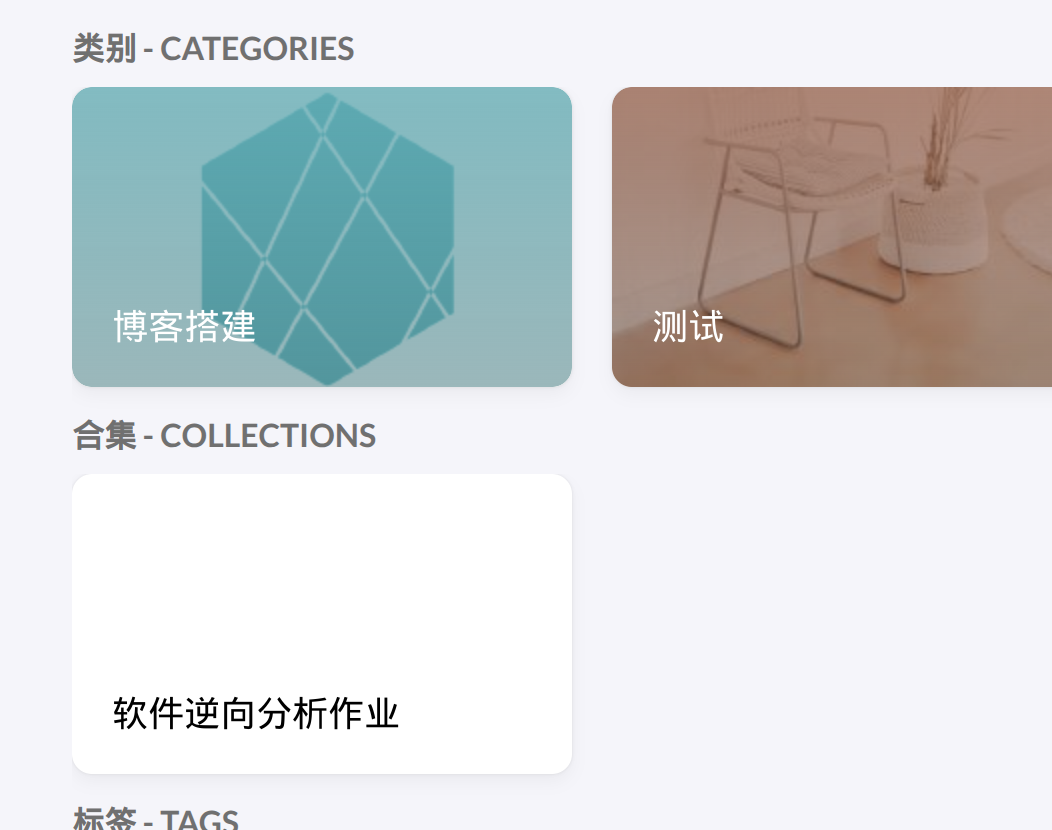

可见成功生效。